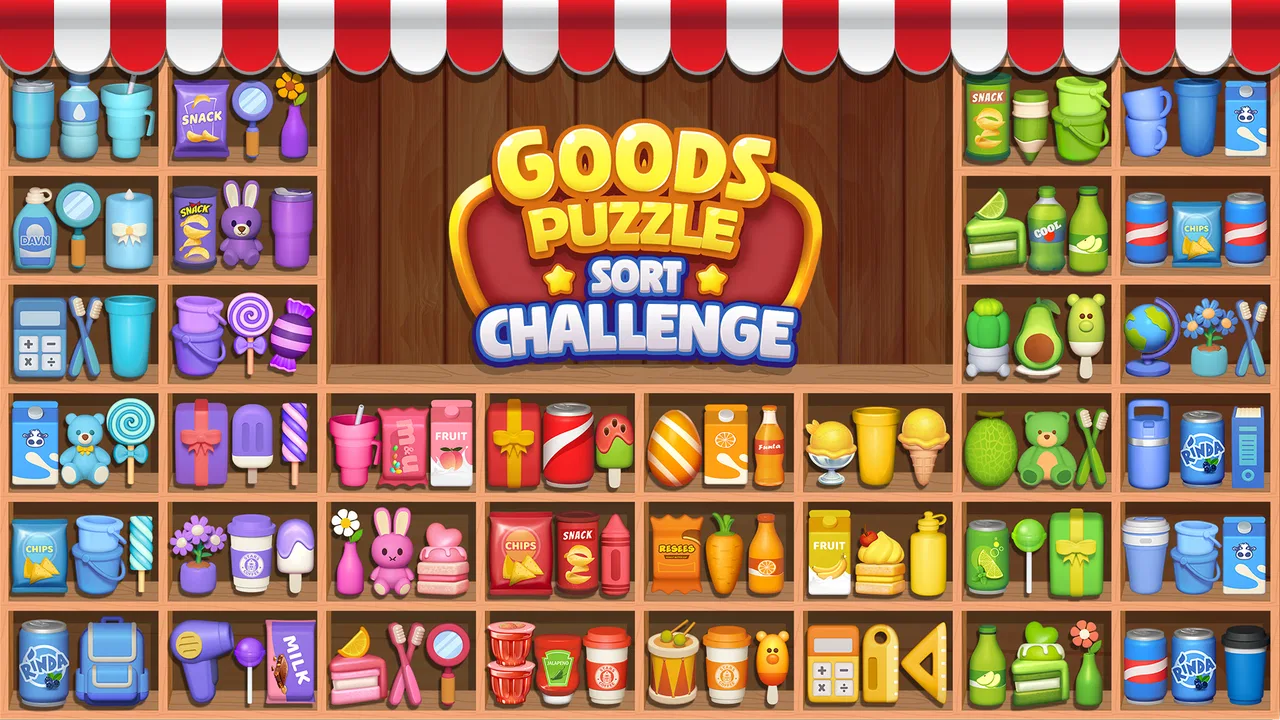
Goods Puzzle: Sort Challenge™
- 4.7
- Rating
- 50.00M
- Installs
- Free
- Price

 Analysis by App-foxy
Goods Puzzle: Sort Challenge™ is the kind of puzzle game I can open for a few quiet minutes and understand almost immediately. The basic idea is simple: I move goods around, rearrange them, and match related items until the shelves or spaces are organized. That simplicity makes it approachable, but the later decisions are more interesting than the first impression suggests. A move that looks helpful can leave an awkward gap, block a useful item, or make the next match harder.
After spending time with it, I see the game as a relaxed but increasingly demanding sorting challenge rather than a traditional word puzzle or a fast arcade title. It comes from FALCON GAMES and sits in the puzzle category. The game is free to start, is rated for Everyone, and supports devices running Android 7.0 or later. Its current version is 4.74, while the store page shows a 4.7 average from around 657 thousand ratings and more than 10 million installs. Those numbers suggest that its quick, familiar format has reached a broad audience, although popularity alone does not make every puzzle equally comfortable for every player.
How the board reads and how navigation feels
The strongest part of the experience is the immediate visual goal. I do not need to study a complicated rulebook before making a first move. The goods are presented as objects to sort, and the matching task gives the screen a clear purpose. For someone who prefers learning by doing, that is a real advantage. The interaction is much less intimidating than a puzzle that begins with several menus, symbols, or abstract instructions.
You May Also Like

 Blood Strike: 2.5 Anniversary
Blood Strike’s Loadouts Turn Every Drop Into a Tactical Gamble
A close look at Blood Strike’s custom loadouts: how fast access to signature weapons reshapes its battle royale rhythm, rewards preparation, and narrows the gap between fights.

 Pandora - Music & Podcasts
Pandora’s Music Is Easy to Start, but Harder to Recover
Pandora’s strength is its low-effort path from a seed to a station. Its weak spot is how much confidence it asks you to place in connection, setup, and quiet recovery.

 8 Ball Pool
 Is Built on Rivalries, Rematches, and Routine
A close look at the rivalries, rematches, shared routines, and unanswered safety questions that turn a quick pool match into a persistent mobile community.

 Samsung Music
’s Quiet Strength Is Playing What You Already Own
Its reach comes less from spectacle than from dependable access to a personal library. That simplicity is both the app’s strongest retention engine and its ceiling.

 AccuWeather: Weather Radar
AccuWeather Review: A Quick, Clear Forecast for Everyday Decisions
For everyday plans, the best forecast is the one you can understand quickly. AccuWeather makes rain timing, radar, and local conditions easy to act on, with a few trade-offs.

 Hill Climb Racing
Why Hill Climb Racing Still Turns Crashes Into One More Run
A tiny car, a bumpy hill and one more upgrade: Hill Climb Racing keeps resurfacing because its simple chaos makes every near-miss feel personal.
More From Our News Desk



In normal play, I find myself scanning in a predictable order: first the loose items, then the available spaces, and finally the groups that are close to completion. That rhythm matters because sorting puzzles can become tiring when the board has too many competing elements. Here, the central action remains easy to explain to another person: identify a matching group, drag an item, and reassess the remaining layout.
The visual design also supports short sessions. I can recognize the broad difference between objects without committing to a long play period, which makes the game suitable for a queue, a short break, or a few minutes before bed. I would not describe every board as effortless, though. Once several similar goods appear together, I have to slow down and check details rather than rely on a quick glance. That is where the game shifts from a casual sorting exercise into a visual attention test.
Navigation is easiest when I stay focused on the active puzzle instead of moving repeatedly between screens. The game’s appeal depends on getting into a flow of examining, dragging, and correcting. Anyone who dislikes mobile games that interrupt a simple activity with frequent prompts may find the surrounding experience less comfortable than the puzzle itself. I recommend approaching it with notifications and other distractions reduced, especially on a smaller phone where the board has less room to breathe.
One useful habit is to pause before making the first move. I look for items that are already close to a complete match and identify spaces that may become difficult to access later. This is more effective than immediately dragging the most obvious object. The game rewards a little planning, and that planning also improves readability because I am not constantly reacting to a board that I have made unnecessarily crowded.
Why the simple rules still create decisions
The matching concept is easy to grasp, but the order of actions changes the difficulty. I often have two apparently valid choices: complete a group now or move an item that opens access to several others. Completing a group feels satisfying, yet opening the board can be the better long-term decision. That small trade-off gives the game more substance than a simple “find three identical pictures” activity.
My preferred approach is to separate the board mentally into three layers. I first note what can be matched immediately, then what is partially hidden or blocked, and finally what may become useful after a space is cleared. This keeps me from spending too much time on a single attractive match. It is a practical method for players who find busy screens overwhelming because it turns the whole board into a sequence of smaller observations.
Another helpful technique is to preserve flexibility. If one move can be made in several places, I avoid using the only open position unless it creates a clear benefit. Keeping one or two options available reduces the chance of reaching a frustrating arrangement. This is not a special mode or an advertised feature; it is simply the strategy that makes the sorting format feel more manageable in practice.
Motor comfort, visual demands, and sensory load
The drag-based design is approachable for many players because it uses a familiar phone gesture rather than rapid tapping or complex combinations. I can play at my own pace, which makes it less demanding than reflex-heavy puzzle games. There is no need to memorize a long sequence of controls. For a player who wants a calm interaction, that is one of the clearest strengths.
At the same time, dragging is not automatically easy for everyone. A precise movement can be uncomfortable for someone with hand tremors, limited reach, joint pain, or difficulty maintaining contact with the screen. The challenge is not only recognizing the correct good; it is also placing it accurately without disturbing the surrounding arrangement. On a larger device, the extra screen area may make this easier, while a compact phone can make the same action feel cramped.
I also notice that the game asks for sustained visual discrimination. Similar colors, shapes, or product silhouettes can require a closer look, especially when the board becomes crowded. Players with low vision or color-vision differences may need to rely more heavily on shape and position than on color alone. I would not choose this game as a dependable option for someone who needs large, high-contrast controls or spoken guidance unless they have personally tested it on their device and found the presentation comfortable.
For sensory-sensitive players, the best use may be short, controlled sessions. Sorting itself is relatively predictable, but mobile games can become tiring when visual movement, sound, or interruptions accumulate. I usually lower the device volume when I want the game to function as a quiet focus activity. That also makes it more suitable for shared spaces such as a waiting room, a library, or a break area where a loud game would be inappropriate.
Parents and caregivers may appreciate the Everyone age rating, but I would still judge suitability by the individual child rather than by the label alone. The rules are accessible, yet a child who becomes upset by an unsolved board may need help treating mistakes as part of the process. I would introduce it as a sorting exercise with no pressure to finish quickly, then watch whether the visual density and repeated dragging remain enjoyable.
A practical routine for easier play
When my hands or eyes feel tired, I use a slower routine instead of trying to force speed. I identify one group, move only the item that clearly improves the layout, and take a brief visual reset before continuing. This prevents the common mistake of making several hurried drags and then losing track of what changed. It is especially useful on a phone held in one hand, where precision and visibility are both reduced.
Players who find dragging uncomfortable can also experiment with how they hold the device. Resting it on a table rather than gripping it in the air gives the other hand more stability. A stylus may help some people, although comfort will depend on the device and the player. I would not promise that these adjustments solve every motor barrier, but they can make a meaningful difference during a short session.
Using the game in different everyday situations
Goods Puzzle works best when I want a self-contained activity that does not require a large uninterrupted block of time. A realistic example is a ten-minute wait before an appointment. I can start a puzzle, think through a few arrangements, and stop when my turn arrives without needing to coordinate with another player. That makes it more convenient than a multiplayer puzzle when my attention may be interrupted.
It can also fit a quiet evening routine, particularly for people who enjoy organizing tasks in real life. The satisfaction comes from turning a messy-looking arrangement into a clean one, so the game has a natural appeal for players who like visual order. I would be careful about using it immediately before sleep if puzzle-solving keeps my mind active; for me, the calm presentation helps, but the desire to finish a difficult board can have the opposite effect.
In a family setting, the game can become a shared observation exercise. One person can suggest which item to move while another handles the phone. That arrangement is useful for someone who finds the gesture difficult but still enjoys the reasoning. It also reveals an important limitation: the game is designed around individual screen interaction, so it does not offer the same social back-and-forth as a board game or a cooperative puzzle played by several people.
For travel, the small-session format is appealing, but I would not assume that every journey will be equally comfortable. Bright outdoor light can make any phone screen harder to inspect, and movement can make precise dragging more awkward. On a crowded bus or train, a player may prefer to make only obvious moves and leave more demanding boards for a stable seat. The game is flexible about time, but the physical environment still affects how accessible it feels.
It is also worth considering the cost structure before recommending it to a child or someone who prefers completely predictable spending. The game is free to download and play, with in-app purchase items ranging from $0.99 to $181.99. That wide range makes purchase controls and personal boundaries important. I would treat optional spending as something to review before handing the device to another player, particularly if the person is likely to tap through prompts without considering the cost.
Where the experience still creates friction
The main barrier is the combination of visual detail and precise dragging. A player can understand the rules perfectly and still struggle because the board is difficult to inspect or the target area is uncomfortable to reach. This distinction matters: the game is cognitively simple at the start, but physical and visual demands can rise as the arrangement becomes more complicated.
I also think the format may disappoint players seeking deep variety in puzzle rules. Its pleasure comes from improving decisions within the sorting framework, not from switching between radically different mechanics. If you want logic grids, wordplay, number deduction, or handcrafted story puzzles, a dedicated alternative in one of those styles will probably offer more variety. Goods Puzzle is better for people who enjoy repetition with gradual refinement.
Compared with match-three games, this feels less dependent on quick combinations and more dependent on planning space. Compared with classic jigsaw or picture puzzles, it is more active because each placement changes the next decision. Compared with minimalist logic games, it is more visual and object-based, but potentially less comfortable for someone who prefers text, symbols, or high-contrast abstract shapes.
The free entry point is convenient, yet the presence of purchases changes how I evaluate it for shared devices. I would recommend checking the device’s purchase protections before letting a young player explore independently. For an adult who can ignore optional spending, the model is easier to live with. For someone who wants a one-time purchase with no purchase-related interruptions, another puzzle may be a better match.
There is also a patience issue. Sorting puzzles can feel soothing when I am in the mood to inspect a board, but frustrating when I want immediate stimulation. If I am tired, distracted, or trying to play while walking, I make worse choices and enjoy the experience less. The game deserves a stable moment of attention, even though each individual session can be brief.
Who should try it and who should look elsewhere
I would recommend it to players who like organizing objects, making small strategic decisions, and improving through observation rather than reflexes. It is a good fit for casual puzzle fans, people who enjoy short solo sessions, and families looking for a simple activity that can be explained without a long tutorial. The Everyone rating also makes it broadly approachable, provided the player is comfortable with the visual and touch demands.
I would be more cautious about recommending it to someone who needs strong accessibility controls, dislikes dragging, or finds similar-looking objects tiring to distinguish. It is also not my first choice for players who want a narrative campaign, competitive multiplayer, or a constant stream of entirely new mechanics. In those cases, a different puzzle style will likely feel more rewarding.
For older adults or players new to mobile games, I would begin on a larger screen and encourage slow play. The game’s rules are a strength here, but the physical presentation matters just as much as the concept. If the player can comfortably see the goods and complete a drag without strain, the straightforward structure gives them a fair chance to enjoy the reasoning.
My inclusive verdict after playing
Goods Puzzle: Sort Challenge™ succeeds because it makes the first decision obvious while leaving room for better decisions later. I like the way a simple act of arranging goods gradually becomes a lesson in preserving space, choosing an order, and avoiding moves that close off future options. The game is easy to recommend as a free puzzle for short, quiet sessions, and its large player base reflects how approachable the core idea is.
My recommendation comes with a clear qualification: accessibility here depends heavily on the player’s vision, touch precision, device size, and tolerance for repeated sorting. The game supports a slower pace and familiar gestures, which helps in many situations, but those qualities should not be confused with comprehensive support for every ability. I would test a few boards personally before suggesting it to someone with specific motor or sensory needs.
The most useful way to play is to treat each board as a small planning problem rather than a race. Scan before dragging, keep flexible spaces available, and take breaks when the visual details begin to blur. Those habits make the experience more comfortable and reveal its best quality: it rewards attention without demanding the frantic pace found in many mobile games.
Overall, I see this puzzle as a solid choice for anyone who enjoys tidy layouts, object matching, and compact solo challenges. It is less suitable for players searching for rich narrative, broad mechanical variety, or highly customized accessibility options. If that distinction fits your expectations, the free entry point makes it easy to try, while the purchase range means I would keep spending controls in mind from the beginning. Its real strength is not the act of matching alone, but the careful choice of what to move next.
FAQs for Goods Puzzle: Sort Challenge™
01What is Goods Puzzle: Sort Challenge™?
Goods Puzzle: Sort Challenge™ is a strategic sorting game where players organize various items into their correct categories. It combines elements of puzzle-solving and time management, providing an engaging challenge for all ages. The game aims to test your organizational skills while keeping you entertained with vibrant graphics and intuitive controls.
02Is Goods Puzzle: Sort Challenge™ free to play?
Yes, Goods Puzzle: Sort Challenge™ is free to download and play. However, it offers in-app purchases for premium features and items that enhance gameplay. These purchases are optional, and players can fully enjoy the game without spending money. Always ensure in-app purchases are managed, especially if children are playing.
03What platforms support Goods Puzzle: Sort Challenge™?
Goods Puzzle: Sort Challenge™ is available for both Android and iOS devices. Players can download it from the Google Play Store and the Apple App Store. Ensure your device meets the app's system requirements for optimal performance and a smooth gaming experience.
04Are there any ads in Goods Puzzle: Sort Challenge™?
Yes, Goods Puzzle: Sort Challenge™ includes ads, which help support the free version of the game. Players may encounter ads between levels or when accessing certain features. There is an option to remove ads via an in-app purchase, providing an uninterrupted gaming experience for those who prefer it.
05How can I contact customer support for Goods Puzzle: Sort Challenge™?
Players can contact customer support through the app's settings menu, where they'll find a 'Help' or 'Support' option. This feature allows users to submit queries or report issues directly. Additionally, the official website may offer further contact details and a FAQ section for common concerns.
Pros
- Intuitive interface enhances user experience.
- Challenging levels keep players engaged.
- Visually appealing graphics and animations.
- Regular updates with new puzzles.
- Supports offline play for on-the-go fun.
Cons
- Limited hints make some puzzles frustrating.
- Advertisements can be frequent and intrusive.
- Occasional glitches in level transitions.
- In-app purchases can be pricey.
- No multiplayer or social features available.

Goods Puzzle: Sort Challenge™
Gallery